Human in the Loop AI: The Role of Human Review in High-Impact Decisions
When AI informs a decision about benefits, eligibility, or access to services, a caseworker's review only protects the applicant if it leaves a record. How departments assign, record, and measure human review of AI-generated recommendations.
Max Syed
November 14, 2026
A caseworker receives an AI-generated summary of a benefits application. The summary highlights missing information and recommends further review before the application moves forward.
The caseworker checks the original documents and finds that the applicant already provided the information. The AI summary missed it, so the caseworker corrects the record and continues reviewing the application.
Now imagine someone questions that decision six months later. Your department needs to show what the AI recommended, what the caseworker reviewed and why the recommendation was changed.
A caseworker’s review protects the applicant only if it leaves a trace. When the outcome affects someone’s access to services or benefits, your process needs to record what the AI said, what the caseworker checked and what changed.
What the department can show six months later
Without a review record
The AI summary, if it was saved
The final status of the application
The caseworker's recollection of what they checked
With a review record
The AI output and version the caseworker received
The reviewer and the date and time of the review
The source documents that were checked
The change made and the reason for it
The Challenge: Making Human Oversight Part of Everyday Work
Who Reviewed the AI Recommendation
Departments using AI need to establish which activities require human review and who has the authority to make decisions.
An AI system can summarize an application, spot missing information or flag a case that needs attention, but the caseworker who receives that output needs the original records in front of them to check it. If the summary says a document is missing and it isn’t, the caseworker has to be able to record the correction before the application moves forward.
The review record should answer a few straightforward questions:
Who reviewed the AI-generated information?
What recommendation or output did they receive?
When did the review take place?
What decision did the employee make?
Why was the recommendation changed or rejected?
These details help another employee understand the decision without relying on the original reviewer’s memory.
What Federal Research Says About AI Oversight
In July 2025, the Government Accountability Office (GAO) published Generative AI Use and Management at Federal Agencies (GAO-25-107653).
The report examined AI inventories from 11 selected federal entities. It found that reported AI use cases increased from 571 in 2023 to 1,110 in 2024. Generative AI use cases increased from 32 to 282 during the same period.
Reported AI use cases at 11 selected federal entities
Reported AI use cases in 2023 and 2024, from GAO-25-107653
Category
2023
2024
All reported AI use cases
571
1,110
Generative AI use cases
32
282
Source: GAO-25-107653, July 2025. Bars are scaled within each row. Figures are reported use cases, not decisions.
These numbers describe reported AI applications at the selected entities, rather than the number of decisions those systems produced. They show how the range of work involving AI expanded during the reporting period.
The same report identified challenges involving federal policies, technical resources and the management of generative AI. If you are adding AI to an operational process, decide up front who reviews its output.
GAO’s Artificial Intelligence Accountability Framework (GAO-21-519SP) addresses this in key practice 3.9, “Human supervision,” which calls for defining and developing procedures for human supervision of the AI system to ensure accountability.
The National Institute of Standards and Technology (NIST) also addresses human oversight in its AI Risk Management Framework. GOVERN 3.2 focuses on defining the roles and responsibilities of people who use, manage and oversee AI systems.
The precise requirements for a department depend on its applicable laws, policies and the AI system’s intended use.
Why a Review Policy Needs Supporting Records
Suppose your department has a written procedure requiring employees to review AI-generated recommendations before making certain decisions. That procedure establishes responsibility, but managers also need a way to check whether the required reviews take place.
If the caseworker approves the AI-generated summary, the system should record the approval. If the caseworker finds an error, it should retain the correction and the reason for changing the recommendation.
Keeping the review connected to the application also helps when employees change roles or a case is assigned to another person. The next reviewer can see what information was considered and which actions were already completed.
The Solution: Give Human Review a Clear Place in the Workflow
The steps below show where human review fits in the processing of a single benefits application.
Review steps for one benefits application
Step 1AI summary preparedThe system summarizes the application and notes information that may be missing.
Step 2Caseworker checks the sourceThe caseworker compares the summary with the original application documents.
Step 3Outcome recordedThe caseworker approves, corrects or escalates the recommendation.
Step 4Record kept with the caseThe output, reviewer, time, decision and reason remain linked to the application.
Identify Which Decisions Require Review
Start by examining how your department uses AI and where its outputs affect existing decisions.
Some AI activities involve routine administrative support, such as organizing documents or preparing a summary for an employee. Others affect eligibility, compliance findings or access to important services. For federal departments, OMB Memorandum M-25-21 calls the most consequential of these high-impact AI, meaning AI whose output serves as a principal basis for decisions or actions with legal, material, binding or significant effect, including access to critical government services and benefits. For those uses, the memo requires human oversight, intervention and accountability.
For each activity, the department needs to decide what checks are appropriate and who has authority to approve the next step.
In the benefits application process, an AI-generated summary can help the caseworker find relevant information. The authorized employee reviews the source documents and makes the determination according to the applicable program requirements.
Assign Reviews to the Right Employees
Different AI-assisted activities require different knowledge and authority.
A benefits caseworker understands application requirements. A financial reviewer checks payment-related information. A compliance specialist examines findings connected to regulatory obligations.
The workflow should direct each item to someone authorized to review it.
For the benefits application, the caseworker receives the AI summary alongside the relevant documents. If the review identifies an issue outside the caseworker’s authority, the employee can escalate it to the appropriate person.
Each assigned review has a status, a responsible employee and a record of the action taken. Managers can see which items are waiting for attention and which have been completed.
Record the Review When It Happens
Review documentation is easier to maintain when it is part of the employee’s normal work.
When a caseworker opens an AI-generated recommendation, the system can present the supporting documents and the available review actions. The employee checks the information and records the outcome before completing the required step.
A practical review record includes:
The application or case being reviewed
The AI-generated output presented to the employee
The relevant output version
The identity of the reviewer
The date and time of the review
The decision or action taken
The reason for a significant correction or override
In the benefits application, the record shows that the AI identified missing information, the caseworker checked the original submission and the information was already present.
Example review record
Example review record for the benefits application
Case
Benefits application, intake queue
AI output
Summary stated that proof of residence was missing and recommended further review
Output version
Summary model version 3.2, generated at intake
Reviewer
Assigned caseworker, eligibility unit
Date and time
Recorded by the system when the review was completed
Decision
Corrected
Reason
Proof of residence was included in the original submission. The summary did not identify it. The record was corrected and the review continued.
Illustrative example. Field values do not describe a real case.
The department can retain that review history according to its applicable security, privacy and records-retention requirements.
Handle Errors and Escalations
Employees also need a clear process for handling AI-generated information that is incorrect, incomplete or outside their authority to resolve.
If the caseworker finds that a summary contains an error, the workflow allows the employee to correct or reject it. If the case requires further investigation, the employee assigns it to the appropriate reviewer.
A useful process distinguishes between three outcomes: approved, corrected and escalated.
Review outcomes
ApprovedThe employee confirms the information is suitable for the next step.
Employee action
Checks the AI output against the source documents and moves the case forward.
Recorded
The approval, the reviewer, the time and the output version that was approved.
CorrectedThe employee changes or rejects inaccurate information and records the reason.
Employee action
Corrects or rejects the inaccurate information before the case continues.
Recorded
The original AI output, the correction and the reason for the change.
EscalatedThe employee sends the case to someone with the necessary authority or expertise.
Employee action
Assigns the case to the appropriate reviewer.
Recorded
Who escalated the case, to whom, why, and its status while it waits.
The department can then review recurring errors and determine whether the AI system, supporting information or employee instructions need improvement.
For example, repeated mistakes involving the same application field give the technical team something specific to investigate.
Where AI Fits
AI can assist with finding information, summarizing documents and identifying cases that need attention. Its role depends on the task, the available evidence and the department’s approved procedures.
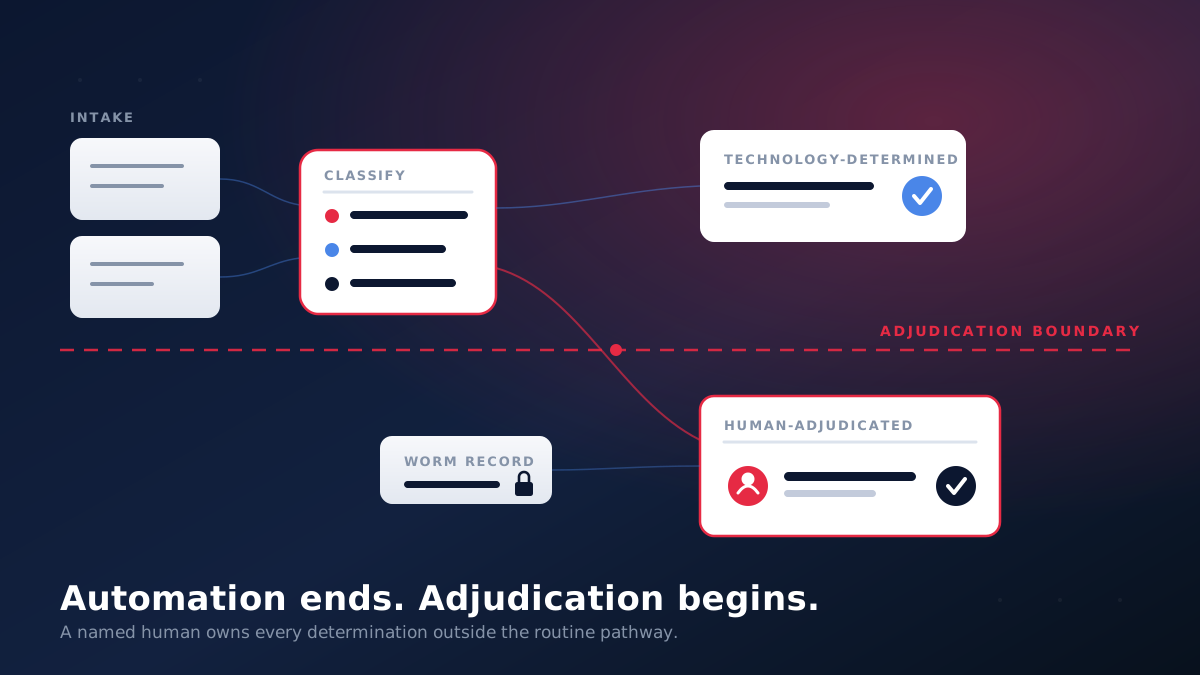
GovSoft’s approach separates activities into three categories: routine, AI-assisted and human decision.
Three categories of work
Routine, AI-assisted and human decision categories
Category
Performed by
Activities
Benefits application example
Routine
Established rules
Organize records, assign work and send reminders.
Route a new application to the intake queue.
AI-assisted
AI, followed by employee review
AI prepares summaries, highlights possible problems and presents supporting information for review.
Summarize the application and note information that may be missing.
Human decision
Authorized employee
Employees make determinations, correct recommendations and approve actions requiring their judgment.
Determine the next action after checking the source documents.
In the benefits example, AI prepares the application summary while the caseworker reviews the original information and determines the next action.
The system records the employee’s decision and links it to the material reviewed. This gives managers a way to examine both the AI recommendation and the human response when a question arises later.
A department using AI needs visibility into how employees handle its recommendations, particularly when those recommendations influence important decisions.
A connected review workflow gives managers a way to see which cases have been reviewed, which are waiting for approval and which were returned for correction. The same information helps employees follow up on outstanding work without searching through separate emails and spreadsheets.
Useful measures
Measures for a human review workflow and what each indicates
Measure
What it indicates
AI-assisted cases awaiting human review
Whether reviews are keeping pace with AI-generated work
Reviews completed by authorized employees
Whether the assigned employees are completing reviews
Recommendations corrected or rejected
Where AI-generated information is inaccurate
Cases escalated for further investigation
Which cases require different authority or expertise
Reviews missing required supporting information
Which decisions may be difficult to explain later
Time taken to complete assigned reviews
Where work is waiting for attention
These measures also help identify patterns that deserve attention. If employees regularly correct the same type of AI-generated error, the department has a specific issue to investigate.
When a decision is questioned, the review history provides a starting point for examining what happened. It shows the information presented, the person who reviewed it and the action recorded at that time.
How GovSoft Approaches Human Oversight of AI
GovSoft helps government and regulated-industry entities improve how information, responsibilities and approvals move through their existing systems. For AI-assisted processes, our starting point is to understand which activities involve important decisions, who reviews the outputs and how those reviews are currently documented.
We identify where employees rely on emails, spreadsheets or separate applications to manage AI-generated recommendations. From there, we design workflows that connect each review to the responsible employee, the supporting information and the recorded decision. The approach fits around the department’s existing systems and approval requirements.
A practical starting point is one AI-assisted process where employees regularly check recommendations before taking action. This provides a manageable way to establish review responsibilities, improve recordkeeping and measure how the process performs.
Our commercial approach has no upfront fees, with payment tied to the operational value delivered by the workflow. If your department uses AI to support important decisions and needs a clearer way to track human reviews, we’d be interested in understanding your current process.
Human review of AI output should be recorded, including what the AI produced, what the employee checked and what changed.
Decide up front which AI-assisted activities require review and who has the authority to approve the next step.
A useful review record captures the case, the AI output and version, the reviewer, the time, the decision and the reason for any correction.
Distinguishing approved, corrected and escalated outcomes lets a department find recurring AI errors and fix their cause.
GAO’s AI Accountability Framework, NIST’s AI RMF and OMB M-25-21 all point to defined human oversight roles, while binding requirements depend on each department’s laws, policies and AI use.
Frequently Asked Questions
What human in the loop AI means
Human in the loop AI describes a process where people participate in reviewing, supervising or making decisions involving AI systems.
The level of involvement depends on the task and the risks involved. Some processes require approval before an action proceeds, while others use human monitoring or review of selected outputs.
Why human review matters in high-impact AI decisions
AI-generated information can contain errors or leave out relevant details. When a recommendation affects benefits, eligibility or another important outcome, the review process needs to account for those risks.
Authorized employees need sufficient information to examine the recommendation and make the required determination.
What a human AI review record should include
A useful record identifies the AI output, the employee who reviewed it, the date and time, the outcome and the reason for significant changes.
Keeping the supporting evidence connected to the review helps employees explain decisions during future assessments.
Whether every AI-generated output needs human approval
The appropriate level of oversight depends on the AI system, the activity and the applicable requirements.
Routine administrative tasks can follow established automation rules. Higher-impact decisions require oversight arrangements that reflect their risks and the department’s obligations.
How GAO and NIST address human oversight of AI
GAO’s AI Accountability Framework includes procedures for human supervision and clear assignment of responsibilities.
NIST’s AI Risk Management Framework also addresses human oversight roles through GOVERN 3.2. Both help departments develop oversight practices, while binding obligations come from applicable laws and policies.
How departments can identify recurring AI errors
Recording corrections and rejected recommendations allows employees to review patterns over time.
If caseworkers repeatedly find that AI summaries overlook a particular type of document, the department can investigate the cause, review the system’s performance and adjust its processes.